
Adding the 777pub Web App to Your iPhone or iPad via Safari
 Updated | By Jomar Alcantara
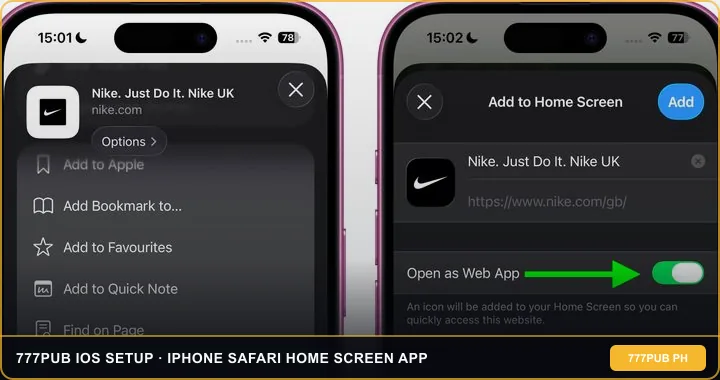
To complete a "777pub com download ios" setup on an iPhone or iPad, you use Apple Safari's native "Add to Home Screen" feature or scan the official QR code rather than searching the Apple App Store. This native iOS web-clip method runs at 60fps on iOS 15 through iOS 18, qualifies for the ₱100 app bonus after ₱1,000 in cumulative deposits, and never asks you to trust risky third-party Enterprise developer certificates.
21+ Only • PHP Cashier Verified • Play Responsibly
- Step 1 - Open in Apple Safari Only: Launch the official portal inside Safari (Chrome on iOS lacks full home-screen web-clip support on older iOS versions)
- Step 2 - Tap the Bottom "Share" Icon: Tap the square icon with an upward arrow at the bottom center of your iPhone screen
- Step 3 - Tap "Add to Home Screen": Scroll down the Share sheet, tap "Add to Home Screen," and tap "Add" in the top-right corner
- Step 4 - Launch From Your Home Screen: Open the new icon to play in full-screen portrait mode and track your ₱100 app bonus eligibility

Why You Should Never Install "Untrusted Enterprise Profiles" on iPhone
If you have tried downloading offshore casino apps on an iPhone in the past, you have probably seen sketchy websites ask you to go into Settings -> General -> VPN & Device Management and trust an unknown corporate certificate (like "China Railway Group" or "Henan Logistics Ltd").
Here is the street-smart truth: Apple revokes those abused enterprise certificates every two weeks, causing the app to suddenly crash with an "Unable to Verify App" error. Even worse, MDM configuration profiles can route your iPhone internet traffic through a proxy server. By using a native Safari Progressive Web App (PWA) instead, the 777pub mobile platform runs inside Apple's sandboxed WebKit engine with 100% iOS security intact.
Optimizing iPhone Safari Settings for Smooth 60fps Slots & Live Tables
Apple's A-series chips run HTML5 slots from PG Soft and JILI effortlessly, but two default iOS settings can interrupt your session or block a GCash/Maya payment window if you do not check them first:
- Allow Pop-Ups for E-Wallet Checkout Redirects: When you tap a ₱100 Maya or GCash top-up inside the cashier, the payment gateway sometimes opens a secure verification tab. If your iPhone silently blocks that tab, go to
Settings -> Safariand toggle off "Block Pop-ups" while funding your wallet. - Disable "Low Power Mode" During 60fps Cascades: When iOS Low Power Mode turns your battery icon yellow, Apple throttles Safari WebGL frame rates from 60fps down to 30fps, making fast cascading games like Super Ace or Gates of Olympus feel choppy.
- Keep "Prevent Cross-Site Tracking" On, But Avoid Private Browsing: Playing inside a dark "Private" Safari tab deletes your local graphic cache every time you close the window, forcing your iPhone to re-download 15MB of slot assets on every visit. Use your dedicated home-screen icon instead.
Unlocking the ₱100 777pub App Bonus on iPhone & Comparing Android Setup
Does the iPhone Safari home-screen web app qualify for the same ₱100 download reward as an Android phone? Yes! The cashier tracks two exact milestones: your account must accumulate at least ₱1,000 in real-money deposits (for example, two ₱500 Maya top-ups), and you must log in through the standalone home-screen app view. Read the complete rollover rules in our guide to claiming the ₱100 app download bonus.
When you switch between Safari and your Maya or GCash app on an iPhone during a deposit, iOS keeps the web-clip active in memory for up to three minutes. Always return straight to the home-screen app icon after entering your e-wallet OTP so the payment callback syncs your new peso balance immediately without requiring a manual page reload.
If you also use an Android device or want to warn friends about fake social media installers, check our walkthroughs on Android Chrome web app installation and why Facebook Messenger APK links are dangerous.
Unlike YouTube or Spotify, WebGL browser games on iPhone obey the physical Ring/Silent switch (or Action Button) on the left side of your phone! If your game has zero sound even with volume turned up, flip your physical iPhone silent switch off mute.
Ready to pin the verified iOS web app to your iPhone or iPad home screen? Open the official portal in Safari below.
777pub iOS & iPhone Download Questions
Is there an official 777pub app in the Apple App Store?
No. Any App Store listing using a similar name is a free-play imitation. The real platform installs onto your iPhone home screen directly from Apple Safari.
Why can I not find "Add to Home Screen" when opening the link in Facebook on iPhone?
Facebook's internal iOS browser hides the Apple Share menu. Tap the three dots or compass icon in the bottom-right corner to "Open in Safari," then tap the Share icon.
Does the iPhone web app work with FaceID login?
Yes. Once you save your username and password to iCloud Keychain during your first Safari login, FaceID fills your credentials automatically.
Which iOS versions support the mobile web app?
Any iPhone or iPad running iOS 14, iOS 15, iOS 16, iOS 17, or iOS 18 runs all 18+ slot studios and live dealer streams smoothly.
Does iCloud Private Relay cause login issues on iPhone?
If iCloud Private Relay routes your IP address through a non-Philippine server, some studio games may lag. Turning off Private Relay for the casino tab gives you a direct local connection.